Agents
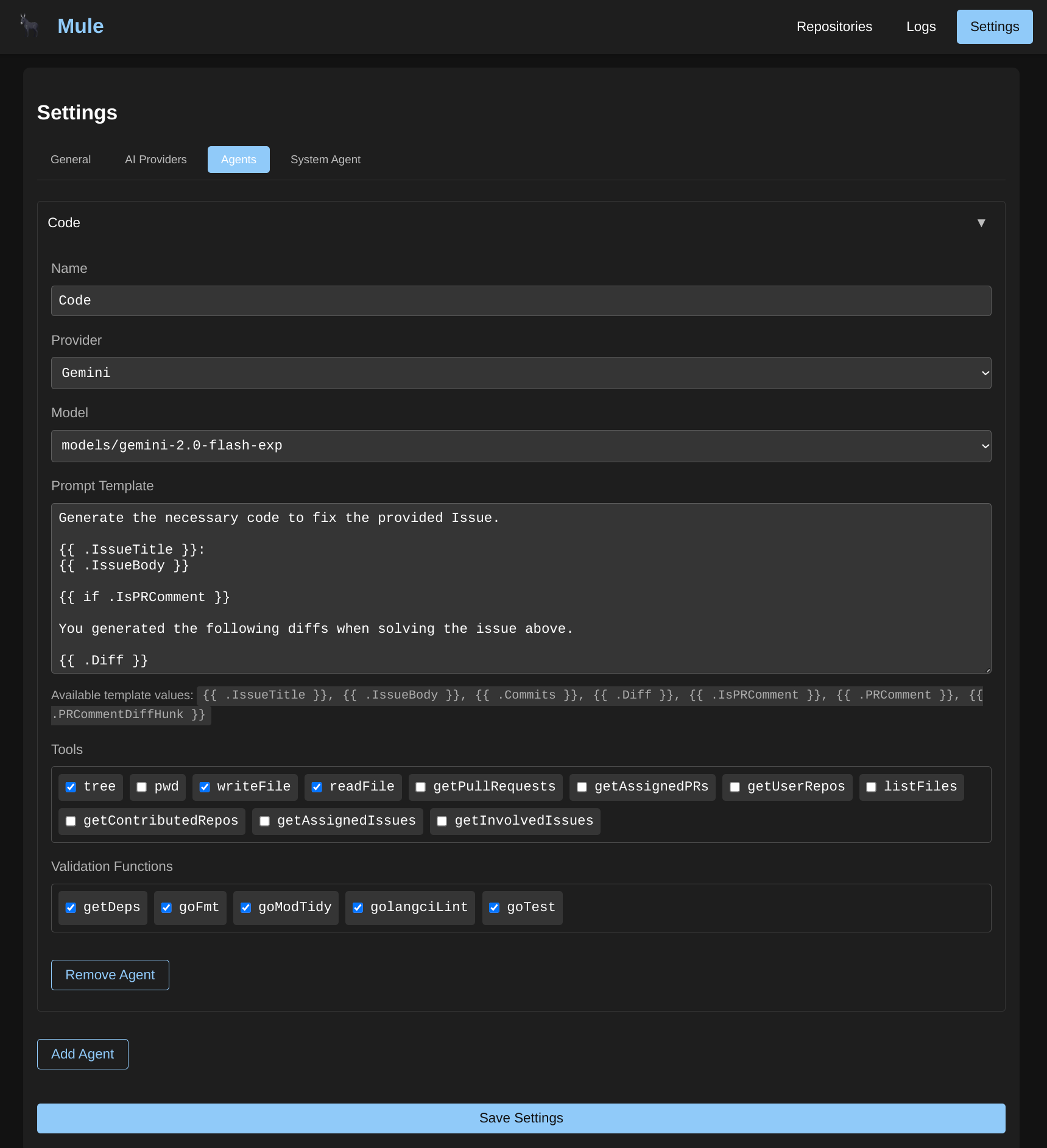
Agents are the core workers in Mule. Each agent is configured with an AI Provider, Model, and a system prompt that defines its behavior.
Agent Configuration
When creating an agent, you configure:
- Name: A descriptive identifier for the agent
- Description: What this agent does (optional)
- AI Provider: The configured AI provider to use
- Model: The specific model from that provider
- System Prompt: Instructions that define the agent’s behavior and capabilities
- Tools: External capabilities the agent can use (filesystem, bash, HTTP, database, memory)
- Skills: pi agent skills that extend the agent’s capabilities
- PI Config: Advanced settings for the PI runtime (thinking level, etc.)
PI Configuration
The PI Config allows you to fine-tune how the agent processes tasks. This is passed as a JSON object when creating or updating an agent:
{
  "thinking_level": "medium"
}
Thinking Levels
The thinking_level setting controls how much reasoning the agent applies before responding:
| Level | Description |
|---|---|
off | No extended thinking - fastest response |
minimal | Minimal reasoning for simple tasks |
low | Light reasoning for straightforward queries |
medium | Balanced reasoning (default) |
high | Deep reasoning for complex problems |
xhigh | Maximum reasoning depth |
Higher thinking levels result in more thoughtful responses but take longer to generate. Adjust based on task complexity.
System Prompt
The system prompt defines how the agent behaves. You can use dynamic variables in the prompt that get filled in at runtime:
{{.Issue.Title}}- The GitHub issue title{{.Issue.Body}}- The GitHub issue description{{.Diff}}- The current code diff (if available){{.PRComments}}- Pull request comments (if available)
Tools
Agents can be assigned tools to interact with external systems:
- filesystem: Read and write files on the system
- bash: Execute shell commands
- http: Make HTTP requests to external APIs
- database: Query databases directly
- memory: Store and retrieve semantic memories using vector embeddings
Memory Tool Configuration
When using the memory tool, the agent can store and retrieve information using semantic search. The memory configuration includes:
- Database URL: PostgreSQL database for vector storage
- Embedding Provider: AI provider for generating embeddings
- Embedding Model: Specific embedding model to use
- Embedding Dimensions: Vector size for the embedding model
- Default TTL: Time-to-live for stored memories (in seconds)
- Default Top-K: Number of similar memories to retrieve
Skills
Skills extend agents with specialized capabilities using pi agent skills. Skills are stored at a specific path and can be enabled or disabled per skill.
To assign skills to an agent:
- Create the skill with a name, description, and path
- Assign the skill to the agent via the agent’s skills configuration
Skills are executed by the pi runtime and can provide additional tools, knowledge, or capabilities to the agent.
Execution Settings
Working Directory
Agents can be configured to operate within a specific working directory. This is useful for:
- Repository-specific operations
- Keeping file operations within a project structure
- Maintaining consistent paths across tool executions
Timeout
Agents have a default timeout of 5 minutes for execution. If an agent takes longer, the operation will be aborted. Adjust the timeout based on the complexity of expected tasks.
Image Support
Agents can process images in prompts when the AI provider supports vision capabilities. This enables:
- Analyzing screenshots or diagrams
- Reading visual code representations
- Processing images as part of the task context
Validation Functions
After an agent generates code, validation can be performed through WASM modules. This allows you to:
- Run linters (gofmt, golangci-lint, ESLint, etc.)
- Execute tests (go test, pytest, etc.)
- Check code formatting
- Validate dependencies
- Run custom build checks
Validation modules receive the generated code as input and return pass/fail results. If validation fails, Mule can make additional attempts to fix issues.
Multi-Agent Workflows
Multiple agents can be used together in workflows, with each agent handling different responsibilities:
- Analysis Agent: Reviews issues and plans code changes
- Generation Agent: Writes the actual code
- Review Agent: Validates and improves generated code
- Commit Agent: Creates appropriate commit messages
See the Workflows documentation for details on chaining agents together in pipelines.
Workflow Integration
Agents are typically used within workflows, where each workflow step can reference a specific agent. This allows you to:
- Chain multiple agents sequentially
- Pass output from one agent as input to another
- Include validation steps between agent executions
- Create sophisticated multi-agent pipelines for complex tasks