AI Providers
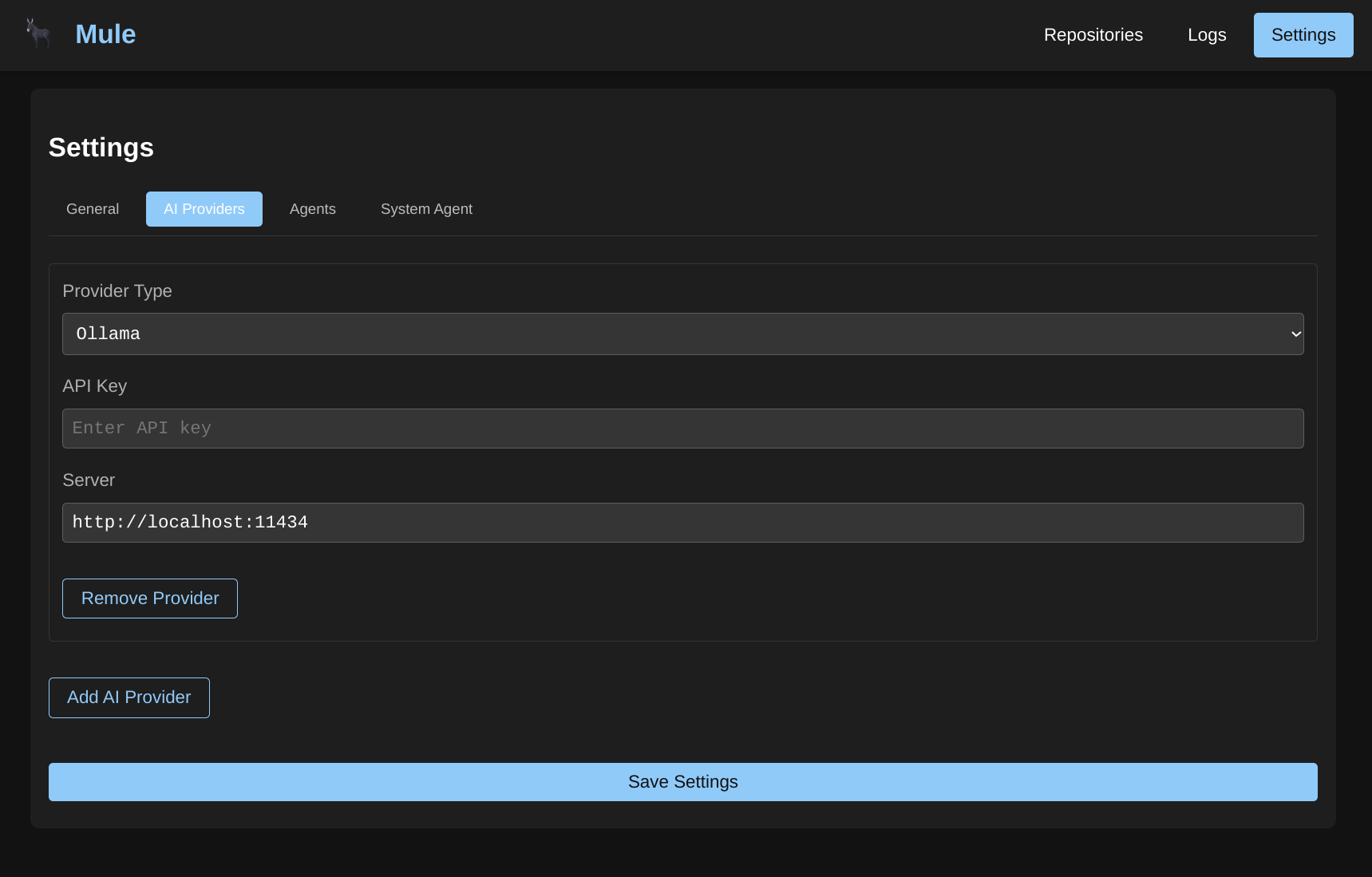
Mule supports configuring multiple AI providers. These are used to provide the models that will be used by Agents.
Mule uses pi as its AI runtime, which supports a wide range of providers. Mule’s internal provider system supports the following core providers:
Core Supported Providers
Mule directly supports these providers through its provider configuration:
| Provider | Description | Authentication |
|---|---|---|
| OpenAI | GPT-4, GPT-4o, and other OpenAI models | API Key |
| Anthropic | Claude models (Claude 3.5 Sonnet, Opus, etc.) | API Key |
| Google Gemini | Gemini 1.5 and Gemini 2.0 models | API Key |
| Ollama | Local LLM inference with OpenAI-compatible API | Local (no key) |
| OpenRouter | Unified access to 100+ models | API Key |
OpenRouter (Recommended for New Users)
Note: Mule creates a default OpenRouter provider on first startup. OpenRouter provides access to multiple AI models through a single API and offers free credits for new users. Sign up at openrouter.ai to get started.
OpenRouter is recommended because it:
- Provides access to 100+ models from various providers
- Offers free credits for new users
- Uses a unified API key for all supported models
- Supports models from OpenAI, Anthropic, Google, Meta, Mistral, and more
Configuration via API
Create a Provider
curl -X POST http://localhost:8140/api/v1/providers \
  -H "Content-Type: application/json" \
  -d '{
    "name": "my-provider",
    "api_base_url": "https://api.openai.com/v1",
    "api_key_encrypted": "sk-your-api-key"
  }'
Provider Configuration Fields
| Field | Description |
|---|---|
name | Display name for the provider |
api_base_url | Base URL for the API endpoint |
api_key_encrypted | Your API key (stored securely) |
Provider-Specific Configuration
OpenAI / OpenAI-Compatible
# Standard OpenAI
api_base_url: "https://api.openai.com/v1"
api_key_encrypted: "sk-your-openai-key"

# OpenRouter
api_base_url: "https://openrouter.ai/api/v1"
api_key_encrypted: "sk-or-v1-your-openrouter-key"

# Azure OpenAI
api_base_url: "https://your-resource.openai.azure.com"
api_key_encrypted: "your-azure-key"
Anthropic
api_base_url: "https://api.anthropic.com"
api_key_encrypted: "sk-ant-your-anthropic-key"
Google Gemini
api_base_url: "https://generativelanguage.googleapis.com"
api_key_encrypted: "your-gemini-key"
Ollama (Local)
api_base_url: "http://localhost:11434/v1"
api_key_encrypted: "ollama"  # or any placeholder
Local Models
For local models, configure Ollama or any OpenAI-compatible server:
Ollama Setup
- Install Ollama from ollama.ai
- Pull a model:
ollama pull llama3.2 - Configure Mule:
curl -X POST http://localhost:8140/api/v1/providers \
  -H "Content-Type: application/json" \
  -d '{
    "name": "ollama-local",
    "api_base_url": "http://localhost:11434/v1",
    "api_key_encrypted": "ollama"
  }'
LM Studio / vLLM
Any OpenAI-compatible inference server works:
{
  "providers": {
    "local": {
      "baseUrl": "http://localhost:1234/v1",  # LM Studio default
      "api": "openai-completions",
      "apiKey": "local",
      "models": [
        { "id": "model-name" }
      ]
    }
  }
}
Note: LM Studio typically runs on port 1234, while vLLM uses port 8000 by default.
## Subscription Providers (OAuth via pi)

Mule uses [pi](https://pi.dev) as its agent runtime, which supports OAuth-based authentication for subscription providers:

- **Claude Pro/Max** - Use `/login` in pi interactive mode
- **ChatGPT Plus/Pro (Codex)** - Use `/login` in pi interactive mode
- **GitHub Copilot** - Use `/login` in pi interactive mode
- **Google Gemini CLI** - Use `/login` in pi interactive mode

For these providers, use the pi CLI's OAuth login flow rather than API keys.

## Cloud Provider Configuration

### Amazon Bedrock

```bash
export AWS_PROFILE=your-profile
# Or IAM keys
export AWS_ACCESS_KEY_ID=AKIA...
export AWS_SECRET_ACCESS_KEY=...
# Optional region
export AWS_REGION=us-west-2
Google Vertex AI
gcloud auth application-default login
export GOOGLE_CLOUD_PROJECT=your-project
export GOOGLE_CLOUD_LOCATION=us-central1
Custom Providers
For custom providers with specific API requirements, you can create a pi extension to register custom provider implementations. See the pi custom provider documentation for details.
All providers support model switching, tool assignment, and dynamic configuration.
Not all fields are required—only the information necessary to interact with your chosen provider must be provided.